Turn your Excel spreadsheet into a business system

For agencies and freelancers who run client projects in Excel

Upload your Excel. Get tables, relations, formulas, dashboards and automations — running in minutes, not weeks.

Full access to Business features · No credit card required

Excel file becoming linked tables and a dashboard

Sound familiar? This is business run in Excel

  • Formulas break when someone edits the wrong cell

    One accidental overwrite and the whole sheet silently goes wrong.

  • No one knows which version is the latest

    Final_v3_REAL.xlsx lives in email, Drive, and three desktops.

  • You can't see the big picture — just rows and columns

    Status, money, and risk are buried in tabs nobody opens.

  • Every client asks “what's the status?”

    You dig through sheets instead of sending a simple answer.

100+ client Excel files maintained
From the field

Trusted by teams who got tired of spreadsheets

Built by developers who have maintained 100+ client spreadsheets — and got tired of being the person who “just knows how the file works.”

Agencies Freelancers Construction Real estate
From spreadsheet to system in three steps

Import what you already have. Connect it. Then run the business from one place.

  1. 01

    Import

    Upload Excel/CSV or paste a public Google Sheets link — we detect tables, fields, and even your formulas automatically.

  2. 02

    Connect

    We turn your data into linked tables — clients, projects, expenses, whatever your business needs.

  3. 03

    Run

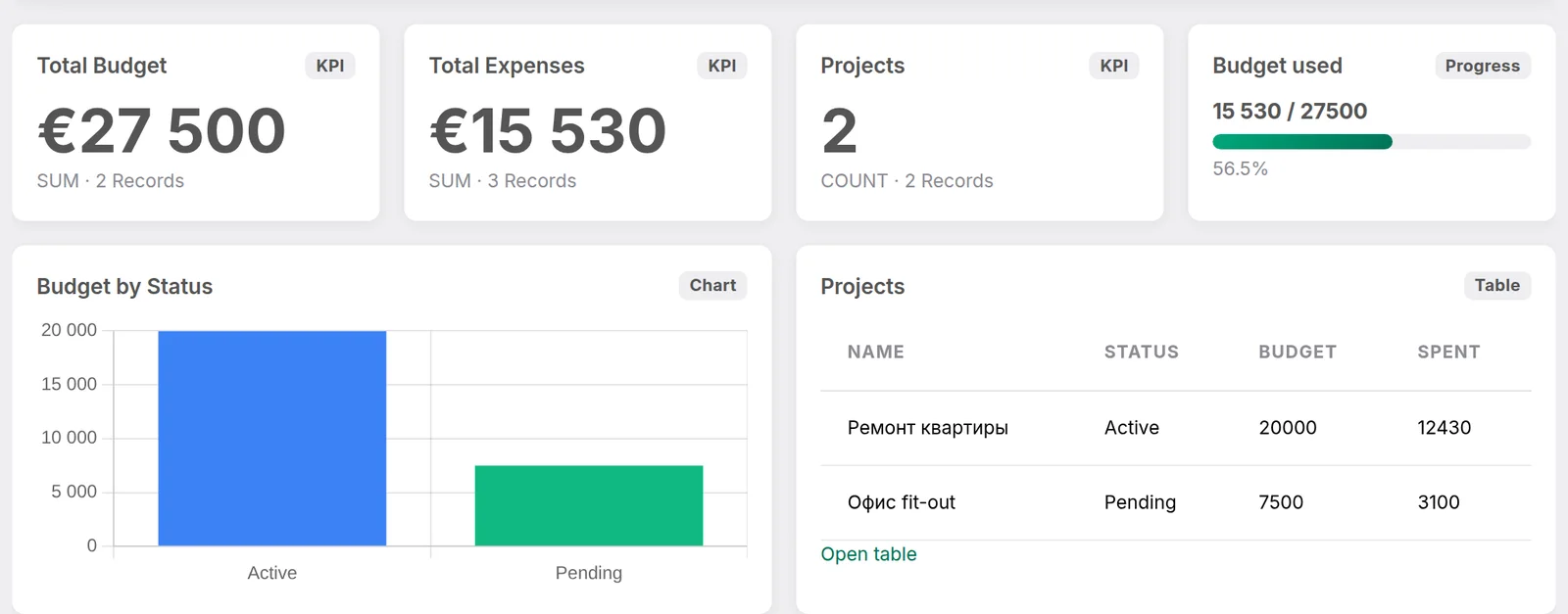
    Get views, dashboards, and automations. Your spreadsheet becomes a system your whole team can use.

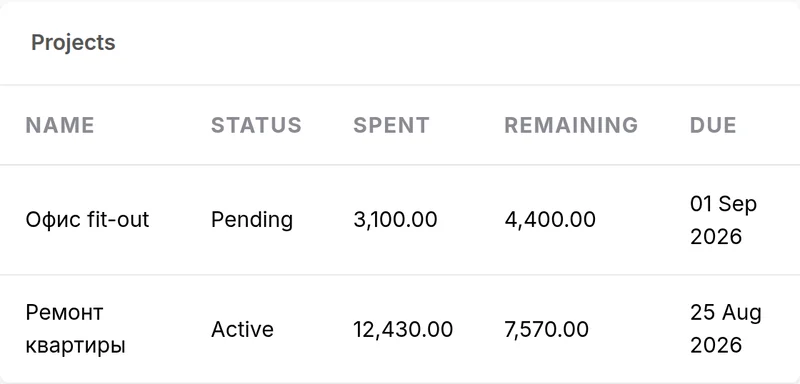
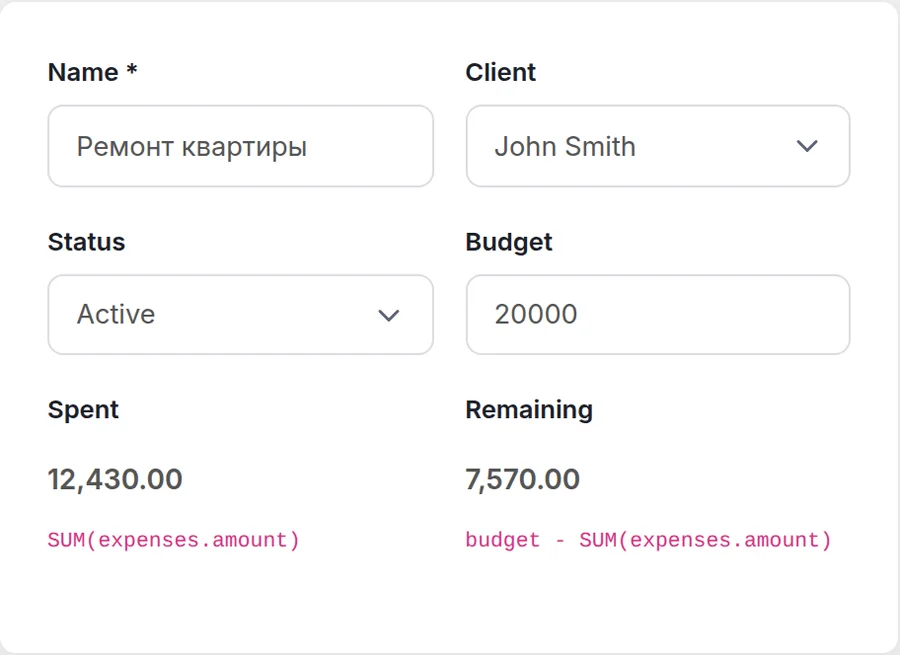
Project record: Budget, Spent and Remaining recalculated from linked expenses
Apartment renovation

Example: a €20,000 renovation estimate

A renovation estimate usually lives in Excel: Materials, Labor, Contractors. Totals break as soon as someone inserts a row.

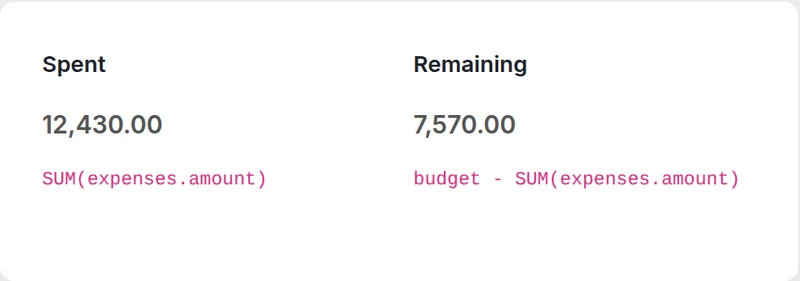
In Voyanty those tables stay linked. Budget is €20,000, Spent is the sum of the linked expenses (€12,430) and Remaining recalculates itself (€7,570) — so you always know what is left.

Everything a spreadsheet can't do

The same data you already keep in Excel — structured so the team can actually run on it.

Tables

Tables

Any part of your business, structured your way

Relations

Relations

Clients → Projects → Expenses, properly connected

Formulas

Formulas

Real calculations across linked data, not just cells

Views

Views

Table, Kanban, Calendar, Gallery — see it your way

Automations

Automations

Emails, updates, reminders — on autopilot

One link, no login

One link, no login

Share a client portal view — they see their project, not the whole workbook.

Start from a template built for your business

Skip the blank page. Pick an industry setup and import your spreadsheet into a structure that already fits.

This isn't another spreadsheet tool

What matters Excel No-code database builders Voyanty
Import your existing Excel — Manual setup
Formulas across relations Fragile Limited
Dashboards out of the box Add-ons Extra work
Built for your industry Blank file Generic base

Simple pricing, no surprises

Every new account gets 14 days of Business features free — no credit card. Then pick Starter, Business or Pro.

14-day free trial · Business features · no card

Starter
$9 / mo

For a solo owner or a small team moving its first Excel files into one place.

  • Users 10
  • Workspaces 3
  • Tables 20
  • Records 10,000
  • Storage 1 GB
  • Automations 10
  • Dashboards ✓
  • Client portal —
  • API access —
  • Advanced permissions —
  • Priority support —
Try for free
Pro
$79 / mo

For companies that need the API, granular permissions and priority support.

  • Users Unlimited
  • Workspaces Unlimited
  • Tables Unlimited
  • Records 1,000,000
  • Storage 100 GB
  • Automations Unlimited
  • Dashboards ✓
  • Client portal ✓
  • API access ✓
  • Advanced permissions ✓
  • Priority support ✓
Try for free

All prices are in US dollars. The trial needs no card and this page never charges one.

In every plan

Excel and CSV import

Upload a file or paste a link — column types, relations and formulas are detected for you.

Export whenever you want

Your data stays yours: export any table back to Excel or CSV on every plan.

Five interface languages

English, Russian, Ukrainian, Polish and German, switched in one click.

Common questions about importing Excel

Do I need to know how to code?

No. Upload a spreadsheet, review the detected tables, and start working. Developers can go further with automations and API access on higher plans.

What happens to my data if I cancel?

Your data stays yours. You can export it. After a trial or subscription ends, workspaces can remain readable so you are not locked out of your own files.

Can I import multiple Excel files?

Yes. Import more than one workbook and connect the tables that belong together.

Can I import from a Google Sheets link?

Yes. On Import, paste a public link (“Anyone with the link”) — or upload a CSV/Excel file as usual. Private sheets still need a downloaded file.

Is my data secure / can other companies see it?

No. Each workspace is isolated. Other companies cannot see your tables, files, or clients. See the privacy policy for details.

Can I invite my client to see just their project?

Yes. The client portal on Business and Pro lets you share a limited view — not the whole workbook.

What if my Excel formulas are too complex to import?

Most common formulas map automatically. Anything we cannot import stays visible so you can rebuild it as a field formula — without breaking the rest of the sheet.

Stop maintaining spreadsheets. Start running a system.

Import your Excel, keep the logic, and give the team a system they can actually use.